
Notice
Recent Posts
Recent Comments
Link
pugnet
도서관 프로그램 만들기 3차 본문
node.js, Sequelize를 이용하여 도서관 프로그램 만들기
제약 조건 :
도서관 프로그램의 메인 로직인(리스트 뷰, 등록, 검색, 수정, 삭제) 등의 기능을 백엔드로 구현
server 디렉터리 내부에 index.js라는 파일에 백엔드 로직 작성, 서버는 node.js로 동작하며 http 기반의 웹 서버여야 함.
사용 기술 :
node.js, sequelize, WEB API
실행 순서 :
1. node.js를 통해 index.js를 실행하여 n번 포트에 http 서버를 할당
2. index.html 파일을 더블클릭하여 크롬에서 서버와의 통신이 가능하도록 함.
3. 크롬에서 만들어진 뷰로 데이터 컨트롤 수행 확인
디렉터리 구성 :
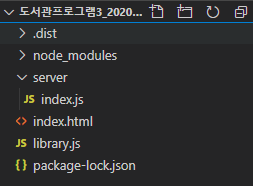
소스코드 :
index.js 소스코드
// 서버 사용을 위해 http 모듈을 http 변수에 담는다.
const http = require("http");
// express 모듈을 불러와서 express 변수에 담는다.
const express = require("express");
const app = express();
const Sequelize = require("sequelize");
const bodyParser = require("body-parser");
const env = process.env.NODE_ENV || 'development';
const cors = require("cors");
const Op = Sequelize.Op;

const config = {
    "development": {
        "username": "root",
        "password": "0000",
        "database": "library",
        "host": "127.0.0.1",
        "dialect": "mysql",
        "operatorAliases": false
    }
}[env];
const db = {};
const sequelize = new Sequelize(config.database, config.username, config.password, config);
db.sequelize = sequelize;
db.Sequelize = Sequelize;

// booklists 테이블 모델 정의
const booklists = sequelize.define('booklists', {
    title: {
        type: Sequelize.STRING(50),
        allowNull: false,
      },
      contents: {
        type: Sequelize.STRING(300),
        allowNull: true,
      },
      author: {
        type: Sequelize.STRING(30),
        allowNull: false,
      },
      publishedAt: {
        type: Sequelize.STRING(255),
        allowNull: false,
      },
});

sequelize.sync({force: false}).then(() => {
    console.log('DB접속');
})

app.set('views', '../');
app.engine('html', require('ejs').renderFile);
app.set('view engine', 'html');

app.use(bodyParser.json());
app.use(bodyParser.urlencoded({ extended: false }));
app.use(cors());

// booklists 목록 출력 API
app.get('/get', async(req, res) => {
    console.log("loadBook...")
    await booklists.findAll()
    .then(results => {
        res.json(results);
    })
});

// 도서 등록 API
app.post('/inputbook', async(req, res) => {
    console.log("input...");
    let title = req.body.title;
    let contents = req.body.contents;
    let author = req.body.author;
    let publishedAt = req.body.publishedAt;
    await booklists.create({
        title: title,
        contents: contents,
        author: author,
        publishedAt: publishedAt
    }).then(result => {
        console.log("successssssssss" + result)
        res.redirect('/')
    }).catch(err => {
        console.log("errrrrrrrrrr" + err)
    })
});

// 도서 수정 API
app.patch('/updatebook', async(req, res) => {
    console.log("update...");
    let title = req.body.title;
    let contents = req.body.contents;
    let author = req.body.author;
    let publishedAt = req.body.publishedAt;
    let id = req.body.id;
    await booklists.update({
        title: title,
        contents: contents,
        author: author,
        publishedAt: publishedAt,
        }, {
            where : {id : id}
        })
        .then(result => {
            console.log("success update" + result)
            res.redirect('/');
            })
            .catch(err => {
                console.log(err);
            })
});

// 도서 삭제 API
app.delete('/deletebook', async(req, res) => {
    let id = req.body.id;
    await booklists.destroy({
        where: {id: id}
    }).then(result => {
        res.json(result);
    }).catch(err => {
        console.log(err);
    });
});

// 도서 검색 API
app.post('/searchbook', async(req, res) => {
    console.log("searchbook...");
    let searchWord = req.body.searchWord;
    let searchStartDate = req.body.searchStartDate;
    let searchLastDate = req.body.searchLastDate;
    searchStartDate = new Date(searchStartDate);
    searchLastDate = new Date(searchLastDate);
    await booklists.findAll({
        where: {
            [Op.and]: {
                [Op.or]: [
                    {title: searchWord},
                    {author: searchWord},
                    {contents: searchWord},
                    {publishedAt: {
                        [Op.gte]: searchStartDate,
                        [Op.lte]: searchLastDate
                    }}
                ]
            }
        }
    }).then(result => {
        res.json(result);
        console.log("success search " + result);
    })
    .catch(err => {
        console.log(err);
    })
})


// listen 함수로 8080 포트를 가진 서버를 실행한다. 서버가 실행된 것을 콘솔창에서 확인하기 위해 'Server is running...'로그를 출력한다.
http.createServer(app).listen(8080, function () {
  console.log("Server is running...");
});
library.js 소스코드
// 도서 목록 출력 함수
function init() {
  fetch("http://localhost:8080/get")
    .then((response) => response.json())
    //.then(data => console.log(data))
    .then((data) => {loadBookList(data)})
    .catch(err => {console.log(err)});
};

// 도서 목록 출력 함수
const element = document.getElementById("books");
const newElement = document.createElement("tbody");

function loadBookList(data) {
  let dataLen = data.length;
  //console.log(dataLen);
  element.appendChild(newElement);
  for (i = 0; i < dataLen; i++) {
    newElement.innerHTML +=
    `<td>${i + 1}</td><td id='${data[i].id}' onclick='showBook(this.id);'>${data[i].title}</td><td id='contents_${data[i].id}'>${data[i].contents}</td><td id='author_${data[i].id}'>${data[i].author}</td><td id='publishedAt_${data[i].id}'>${data[i].publishedAt}</td>`};
  if (dataLen < 5) {
    for (i = 0; i < 5 - dataLen; i++) {
      newElement.innerHTML +=
      `<td>-</td><td>-</td><td>-</td><td>-</td><td>-</td>`;}
  }
};

// 도서 등록 함수
function addBook() {
  // getElementById로 input으로 입력받은 해당 id의 값을 가져와서 변수에 할당
  let title = document.getElementById("title").value;
  let contents = document.getElementById("contents").value;
  let author = document.getElementById("author").value;
  let publishedAt = document.getElementById("publishedAt").value;
  fetch("http://localhost:8080/inputbook", {
      method: "POST",
      body: JSON.stringify({
        title: title,
        contents: contents,
        author: author,
        publishedAt: publishedAt
      }),
      headers: {
        "Content-type": "application/json; charset=UTF-8"
      }
  })
  .then(response => response.json())
  .then(json => console.log(json));
  location.reload();
};

let temp = [];
// 도서 정보 불러오기 함수
function showBook(clicked_id) {
  console.log(clicked_id);
  temp.push(clicked_id);
  for(let i=0; i < 10000; i++) {
    if(clicked_id === `${i}`) {
        document.getElementById("title").value = document.getElementById(`${i}`).innerText;
        document.getElementById("author").value = document.getElementById(`author_${i}`).innerText;
        document.getElementById("publishedAt").value = document.getElementById(`publishedAt_${i}`).innerText;
        document.getElementById("contents").value = document.getElementById(`contents_${i}`).innerText;
    }
  }
}

// 도서 수정
function updateBook() {
  console.log(temp[temp.length -1]);
  let title = document.getElementById("title").value;
  let contents = document.getElementById("contents").value;
  let author = document.getElementById("author").value;
  let publishedAt = document.getElementById("publishedAt").value;
  let id = temp[temp.length -1];
  fetch("http://localhost:8080/updatebook", {
      method: "PATCH",
      body: JSON.stringify({
        title: title,
        contents: contents,
        author: author,
        publishedAt: publishedAt,
        id: id
      }),
      headers: {
        "Content-type": "application/json; charset=UTF-8"
      }
  })
  .then(response => response.json())
  .then(json => console.log(json));
  location.reload();
};

// 도서 삭제
function deleteBook() {
  let id = temp[temp.length -1];
  fetch("http://localhost:8080/deletebook/", {
    method: "DELETE",
    body: JSON.stringify({
      id: id
    }),
    headers: {
      "Content-type": "application/json; charset=UTF-8"
    }
  })
  .then(response => response.json())
  .then(json => console.log(json))
  .catch(err => console.log(err));
  location.reload();
}

// 도서 검색
function searchBook() {
  newElement.innerHTML = "";
  let searchWord = document.getElementById("searchInput").value;
  let searchStartDate = document.getElementById("startDate").value;
  let searchLastDate = document.getElementById("endDate").value;
  fetch("http://localhost:8080/searchbook", {
    method: "POST",
    body: JSON.stringify({
      searchWord: searchWord,
      searchStartDate: searchStartDate,
      searchLastDate: searchLastDate
    }),
    headers: {
      "Content-type": "application/json; charset=UTF-8"
    },
  })
  .then(response => response.json())
  // .then(json => console.log('정답',json))
  // .catch(err => console.log(err))
  .then((data) => loadBookList(data))
}
index.html 소스코드
<!DOCTYPE html>
<html>
    <head>
        <title>작은 도서관</title>
        <link rel="stylesheet" href="styel.css">
    </head>
    <body onload="init();">
        <div id="library">
            <!-- 검색창 -->
            <div id="searchBooks" class="searchBooks">
                <!-- 제목/저자/내용으로 검색 -->
                <input type="text" id="searchInput" class="searchBooks" placeholder="제목/내용/저자로 검색">
                <input type="date" id="startDate" class="searchBooks"> ~
                <input type="date" id="endDate" class="searchBooks">
                <button type="button" onclick="searchBook()"><strong>검색</strong></button>
            </div>
            <!-- 책 목록 출력 -->
            <div id="showBooks">
                <table id="books" class="showBooks">
                    <thead>
                        <tr>
                            <th id="no" class="showBooks">순번</th>
                            <th id="titleList" class="showBooks">제목</th>
                            <th id="contentsList" class="showBooks">내용</th>
                            <th id="authorList" class="showBooks">저자</th>
                            <th id="publishedAtList" class="showBooks">출간일자</th>
                        </tr>
                    </thead>
                </table>
            </div>
            <!-- 도서 등록/수정 창 -->
            <div id="addBook">
                <h2>새로운 서적 등록/수정</h2>
                <!-- 제목 입력 -->
                <input type="text" id="title" name="title" class="addBook" placeholder="제목">
                <!-- 저자 입력 -->
                <input type="text" id="author" name="author" class="addBook" placeholder="저자">
                <!-- 출간날짜 입력 -->
                <input type="date" id="publishedAt" name="publishedAt" class="addBook">
                <!-- 내용 입력 -->
                <input type="text" id="contents" name="contents" class="addBook" placeholder="내용">
                <!-- 등록 버튼 -->
                <span>
                    <button type="button" id="addBtn" class="addBtn" onclick="addBook()"><strong>등록</strong></button>
                    <button type="button" id="upDBtn" onclick="updateBook()"><strong>수정</strong></button>
                    <button type="submit" id="delBtn" onclick="deleteBook()"><strong>삭제</strong></button>
                </span>
            </div>

        </div>
        <script src="/library.js"></script>
    </body>


</html>
style.css 소스코드
input:focus {
  outline-color: cornflowerblue;
}
button:hover {
  background-color: skyblue;
  color: white;
}
tr:hover {
  background-color: #f5f5f5;
}
button {
  width: 10%;
  background-color: white;
  border: 3px solid black;
  color: black;
  padding: 5px;
  border-radius: 5px;
  margin: 4px 2px;
  transition-duration: 0.4s;
  cursor: pointer;
}
div {
  border: 3px solid black;
  padding: 7px;
  margin: 5px;
  border-radius: 5px;
}
input {
  border: 3px solid black;
  margin: auto;
  padding: 4px;
  border-radius: 5px;
  font-size: small;
}
h2 {
  margin-top: 2px;
  margin-bottom: 7px;
}
table {
  width: 100%;
  border-collapse: collapse;
  text-align: center;
}
th {
  height: 25px;
  background-color: skyblue;
  color: white;
}
th,
td {
  padding: 5px;
  border-bottom: 1px solid #ddd;
}
tbody {
  height: 40px;
}
.searchBooks {
  padding: 7px;
  text-align: center;
}
.addBook {
  padding: 7px;
  margin-right: 5px;
}
#searchBooks,
#addBook {
  border: 3px solid black;
}
#searchInput {
  padding: 9px;
  margin-right: 5px;
  width: 430px;
}
#endDate {
  margin-right: 10px;
}
#showBooks {
  width: auto;
  height: 200px;
  overflow-y: auto;
}
#no {
  width: 80px;
}
#titleList {
  width: 250px;
}
#contentsList {
  width: 300px;
}
#authorList {
  width: 150px;
}
#publishedAtList {
  width: 100px;
}
#title {
  width: 400px;
}
#author {
  width: 100px;
}
#contents {
  margin-top: 10px;
  width: 685px;
  height: 100px;
}
#addBtn {
  position: absolute;
  right: 100px;
  top: 420px;
}
#delBtn {
  position: absolute;
  right: 100px;
  top: 470px;
}
'Programming > ToyProject' 카테고리의 다른 글
| Spring boot + Vue.js 환경세팅(1) (1) | 2023.07.01 |
|---|
'Programming/ToyProject' Related Articles
more
