
Notice
Recent Posts
Recent Comments
Link
pugnet
Section 5. 실무에서 느껴 본 쿠버네티스가 정말 편한 이유 [복습] 본문
실제 프로젝트를 할때 구조적인 문제 -> 쿠버네티스 생태계를 사용하면
1. 개발과 모니터링 시스템이 서로 엮일 수 밖에 없는 구조 -> 엮이지 않는
2. 개발에서는 한 번도 써보지 않은 (개발 시스템을 위한)모니터링 시스템을 만드는 구조 -> 초기부터 바로 쓸 수 있는
3. 오픈 시 개발 프로젝트와 서로 다른 범위의 App들을 모니터링 하게 되는 구조 -> 자동으로 같아지는 범위
모니터링 설치
# 강사님 git에서 prometheus(with grafana), loki-stack 다운로드
[root@k8s-master ~]# yum -y install git
# 로컬 저장소 생성
[root@k8s-master ~]# git init monitoring
Initialized empty Git repository in /root/monitoring/.git/
[root@k8s-master ~]# git config --global init.defaultBranch main
[root@k8s-master ~]# cd monitoring
# remote 추가
[root@k8s-master monitoring]# git remote add -f origin https://github.com/k8s-1pro/install.git
Updating origin
remote: Enumerating objects: 3523, done.
remote: Counting objects: 100% (347/347), done.
remote: Compressing objects: 100% (203/203), done.
remote: Total 3523 (delta 154), reused 301 (delta 123), pack-reused 3176 (from 1)
Receiving objects: 100% (3523/3523), 2.61 MiB | 20.38 MiB/s, done.
Resolving deltas: 100% (1524/1524), done.
From https://github.com/k8s-1pro/install
 * [new branch]      main       -> origin/main
 # sparse checkout 설정
[root@k8s-master monitoring]# git config core.sparseCheckout true
[root@k8s-master monitoring]# echo "ground/k8s-1.27/prometheus-2.44.0" >> .git/info/sparse-checkout
[root@k8s-master monitoring]# echo "ground/k8s-1.27/loki-stack-2.6.1" >> .git/info/sparse-checkout
# 다운로드
[root@k8s-master monitoring]# git pull origin main
From https://github.com/k8s-1pro/install
 * branch            main       -> FETCH_HEAD

 # Prometheus 설치
 [root@k8s-master monitoring]# kubectl apply --server-side -f ground/k8s-1.27/prometheus-2.44.0/manifests/setup
 [root@k8s-master monitoring]# kubectl wait --for condition=Established --all CustomResourceDefinition --namespace=monitoring
 [root@k8s-master monitoring]# kubectl apply -f ground/k8s-1.27/prometheus-2.44.0/manifests
 [root@k8s-master monitoring]# kubectl get pods -n monitoring
NAME                                   READY   STATUS              RESTARTS   AGE
grafana-646b5d5dd8-hszjw               0/1     ContainerCreating   0          9s
kube-state-metrics-86c66b4fcd-zcdgw    0/3     ContainerCreating   0          9s
node-exporter-4hx5n                    0/2     ContainerCreating   0          9s
prometheus-adapter-648959cd84-zmkrq    0/1     ContainerCreating   0          9s
prometheus-operator-7ff88bdb95-qlkwz   0/2     ContainerCreating   0          9s
[root@k8s-master monitoring]# kubectl get pods -n monitoring
NAME                                   READY   STATUS    RESTARTS   AGE
grafana-646b5d5dd8-hszjw               1/1     Running   0          4m44s
kube-state-metrics-86c66b4fcd-zcdgw    3/3     Running   0          4m44s
node-exporter-4hx5n                    2/2     Running   0          4m44s
prometheus-adapter-648959cd84-zmkrq    1/1     Running   0          4m44s
prometheus-k8s-0                       2/2     Running   0          4m7s
prometheus-operator-7ff88bdb95-qlkwz   2/2     Running   0          4m44s

# Loki-Stack 설치
# 설치
[root@k8s-master monitoring]# kubectl apply -f ground/k8s-1.27/loki-stack-2.6.1
[root@k8s-master monitoring]# kubectl get pods -n loki-stack
NAME                        READY   STATUS              RESTARTS   AGE
loki-stack-0                0/1     ContainerCreating   0          6s
loki-stack-promtail-7hzmt   0/1     ContainerCreating   0          6s
[root@k8s-master monitoring]# kubectl get pods -n loki-stack
NAME                        READY   STATUS    RESTARTS   AGE
loki-stack-0                0/1     Running   0          27s
loki-stack-promtail-7hzmt   1/1     Running   0          27s
[root@k8s-master monitoring]# kubectl get pods -n loki-stack
NAME                        READY   STATUS    RESTARTS   AGE
loki-stack-0                0/1     Running   0          70s
loki-stack-promtail-7hzmt   1/1     Running   0          70s
[root@k8s-master monitoring]# kubectl get pods -n loki-stack
NAME                        READY   STATUS    RESTARTS   AGE
loki-stack-0                1/1     Running   0          2m4s
loki-stack-promtail-7hzmt   1/1     Running   0          2m4s
설치 확인


Prometheus 접속
http://192.168.56.30:30001/

Loki-Stack 연결

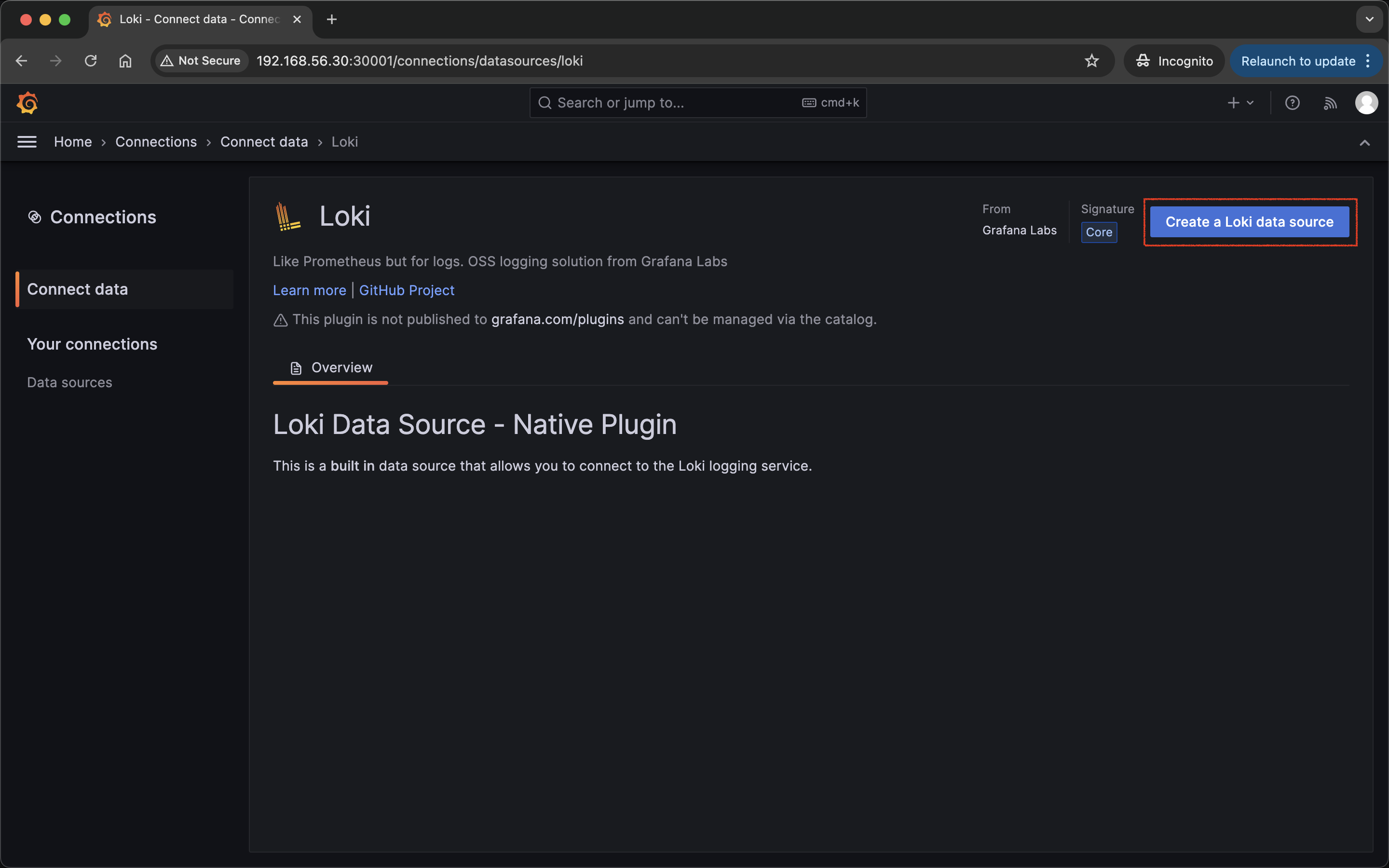
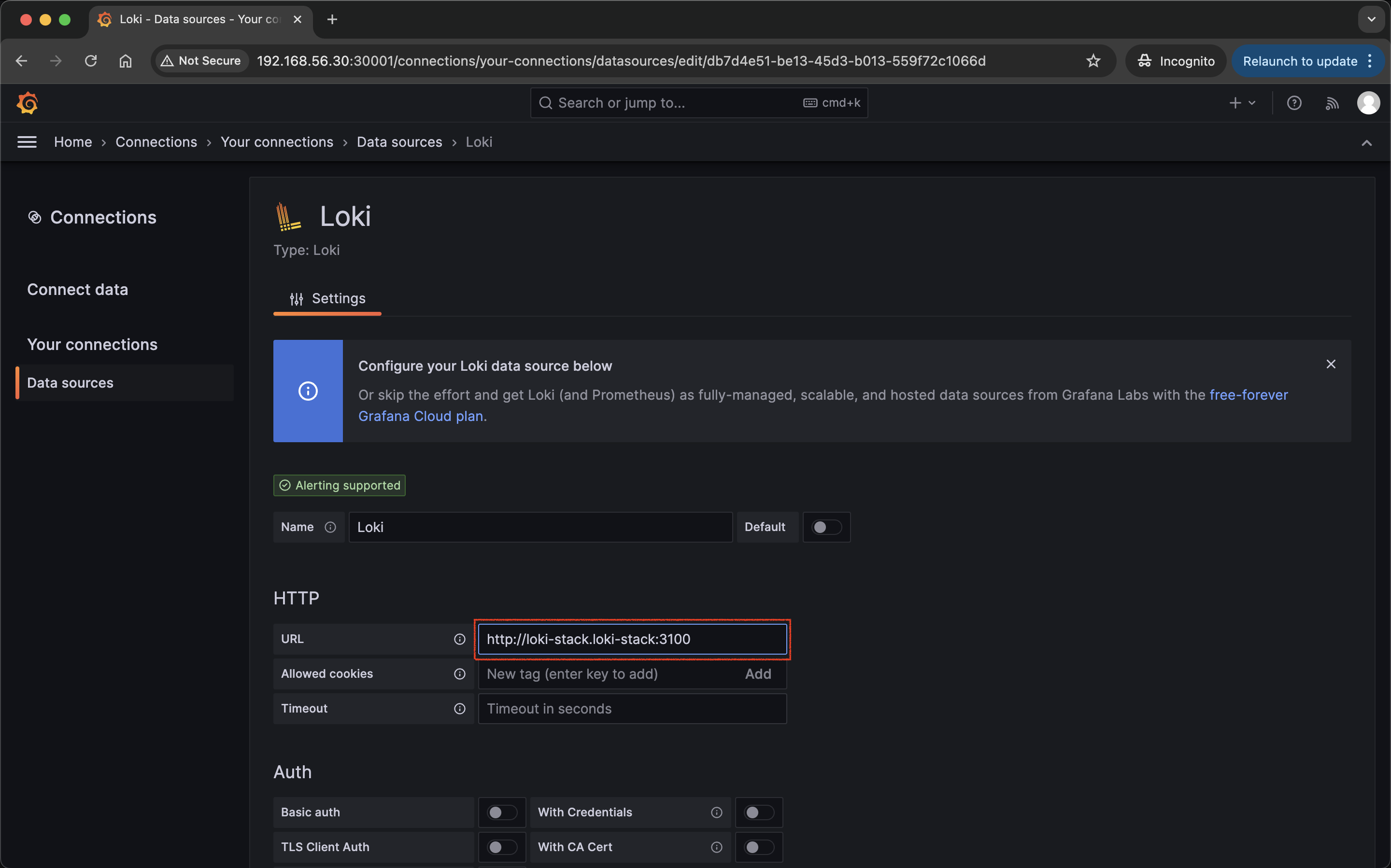
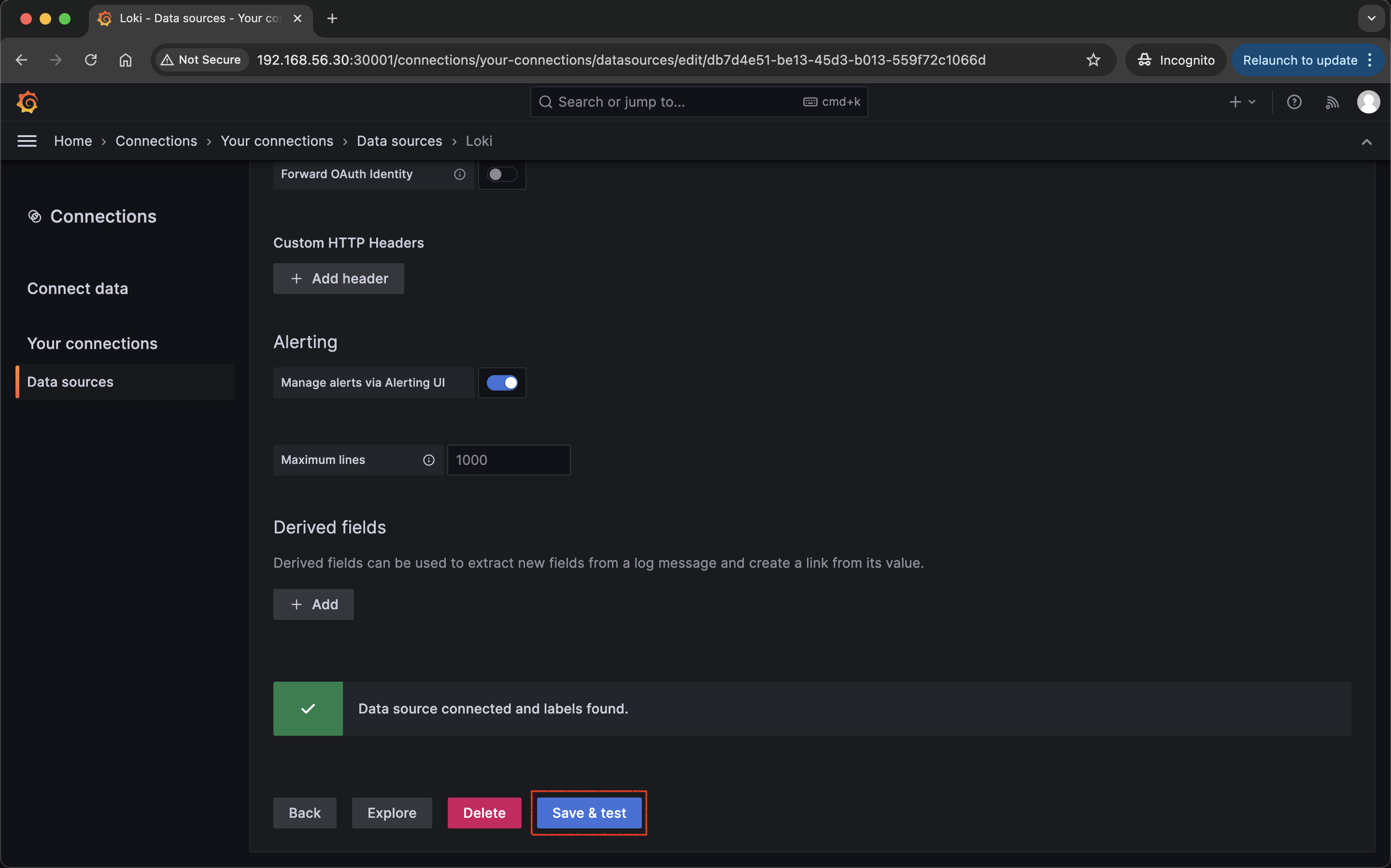
Data spirces 만들기
URL : http://loki-stack.loki-stack:3100
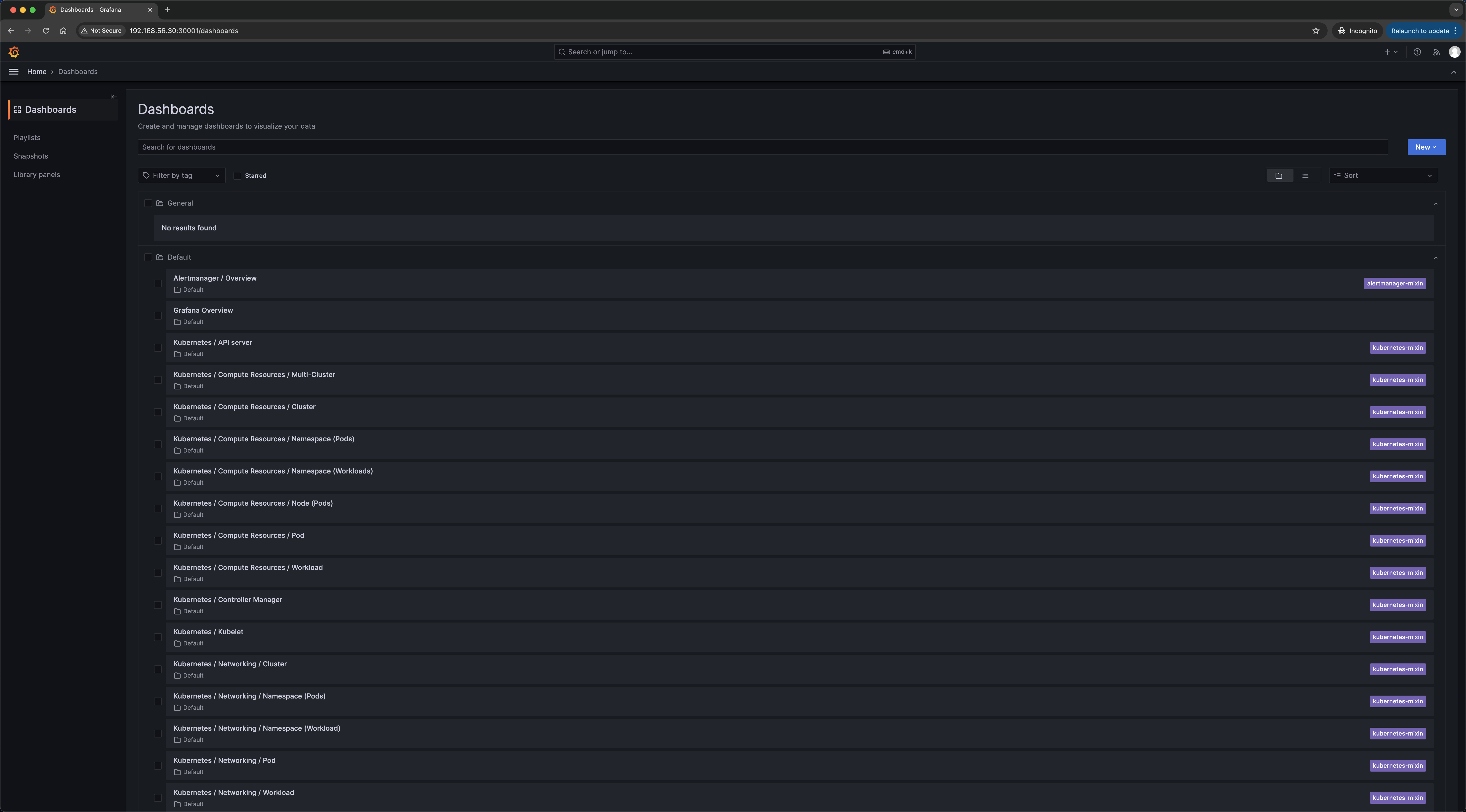
Dashboard에 데이터가 보여야 하는데 안보인다..?
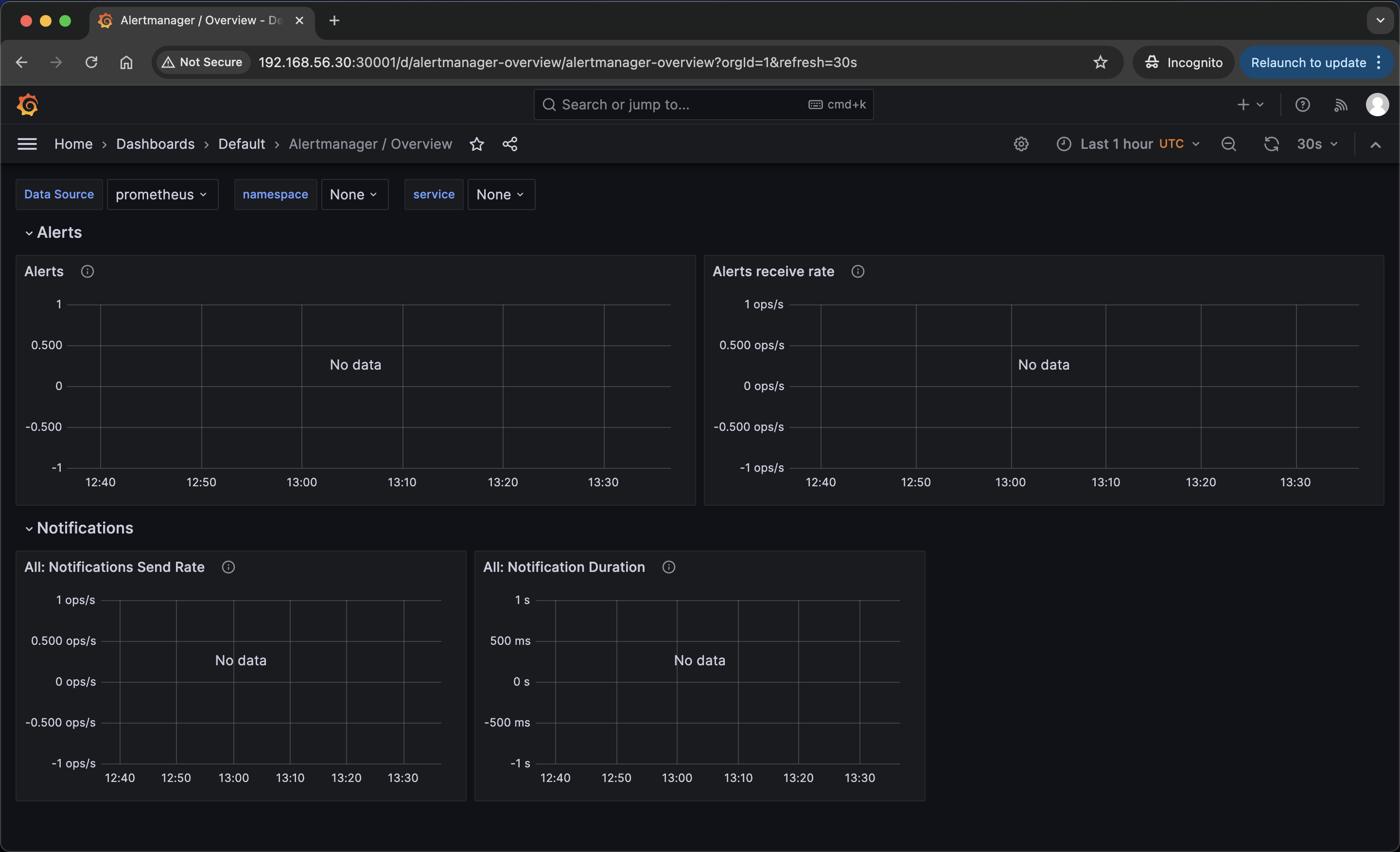
동일 현상을 겪은 카페 댓글에서 해결 방법을 찾았다
#
[root@k8s-master monitoring]# timedatectl
               Local time: Sun 2025-06-08 22:40:34 KST
           Universal time: Sun 2025-06-08 13:40:34 UTC
                 RTC time: Sun 2025-06-08 13:40:35
                Time zone: Asia/Seoul (KST, +0900)
System clock synchronized: no
              NTP service: active
          RTC in local TZ: no

[root@k8s-master monitoring]# yum install -y chrony
[root@k8s-master monitoring]# timedatectl set-ntp true
[root@k8s-master monitoring]# timedatectl
               Local time: Sun 2025-06-08 22:38:59 KST
           Universal time: Sun 2025-06-08 13:38:59 UTC
                 RTC time: Sun 2025-06-08 13:39:00
                Time zone: Asia/Seoul (KST, +0900)
System clock synchronized: yes
              NTP service: active
          RTC in local TZ: no
[root@k8s-master monitoring]# systemctl restart chronyd.service
# 서비스 재시작을 하니까 원복..?
[root@k8s-master monitoring]# timedatectl
               Local time: Sun 2025-06-08 22:40:34 KST
           Universal time: Sun 2025-06-08 13:40:34 UTC
                 RTC time: Sun 2025-06-08 13:40:35
                Time zone: Asia/Seoul (KST, +0900)
System clock synchronized: no
              NTP service: active
          RTC in local TZ: no
# 재부팅
[root@k8s-master monitoring]# shutdown -r now
[root@k8s-master ~]# timedatectl
               Local time: Sun 2025-06-08 22:42:43 KST
           Universal time: Sun 2025-06-08 13:42:43 UTC
                 RTC time: Sun 2025-06-08 13:42:44
                Time zone: Asia/Seoul (KST, +0900)
System clock synchronized: yes
              NTP service: active
          RTC in local TZ: no
[root@k8s-master ~]# k get deployments.apps -A
NAMESPACE              NAME                        READY   UP-TO-DATE   AVAILABLE   AGE
anotherclass-123       api-tester-1231             0/2     2            0           2d2h
calico-apiserver       calico-apiserver            2/2     2            2           10d
calico-system          calico-kube-controllers     1/1     1            1           10d
calico-system          calico-typha                1/1     1            1           10d
kube-system            coredns                     2/2     2            2           10d
kube-system            metrics-server              1/1     1            1           10d
kubernetes-dashboard   dashboard-metrics-scraper   1/1     1            1           10d
kubernetes-dashboard   kubernetes-dashboard        1/1     1            1           10d
monitoring             grafana                     1/1     1            1           39h
monitoring             kube-state-metrics          1/1     1            1           39h
monitoring             prometheus-adapter          1/1     1            1           39h
monitoring             prometheus-operator         1/1     1            1           39h
tigera-operator        tigera-operator             1/1     1            1           10d
[root@k8s-master ~]# k rollout restart deployment -n monitoring
deployment.apps/grafana restarted
deployment.apps/kube-state-metrics restarted
deployment.apps/prometheus-adapter restarted
deployment.apps/prometheus-operator restarted
화면이 나온다..!!

내 쿠버네티스 대시보드에 App 배포
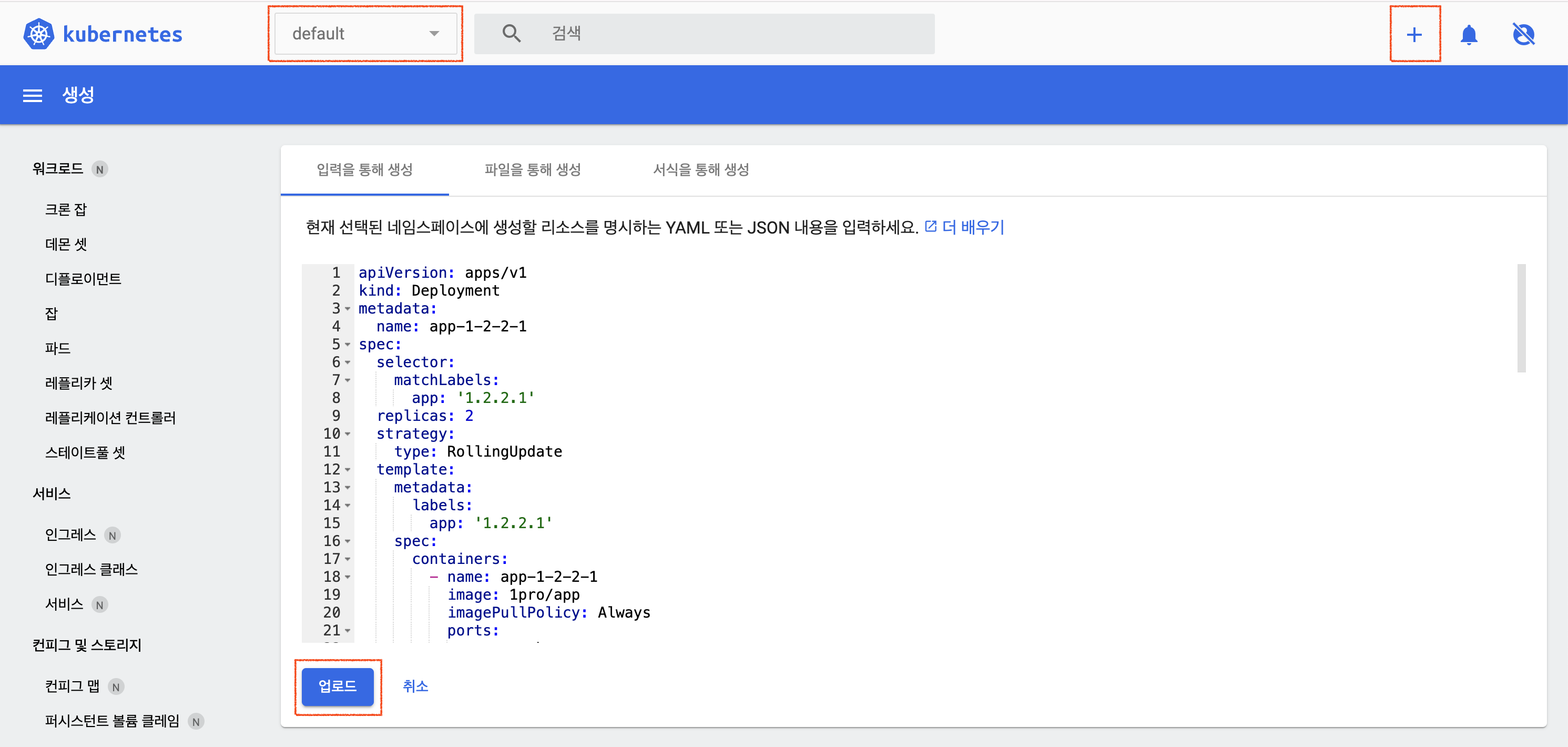
apiVersion: apps/v1
kind: Deployment
metadata:
  name: app-1-2-2-1
spec:
  selector:
    matchLabels:
      app: '1.2.2.1'
  replicas: 2
  strategy:
    type: RollingUpdate
  template:
    metadata:
      labels:
        app: '1.2.2.1'
    spec:
      containers:
        - name: app-1-2-2-1
          image: 1pro/app
          imagePullPolicy: Always
          ports:
            - name: http
              containerPort: 8080
          startupProbe:
            httpGet:
              path: "/ready"
              port: http
            failureThreshold: 20
          livenessProbe:
            httpGet:
              path: "/ready"
              port: http
          readinessProbe:
            httpGet:
              path: "/ready"
              port: http
          resources:
            requests:
              memory: "100Mi"
              cpu: "100m"
            limits:
              memory: "200Mi"
              cpu: "200m"
---
apiVersion: v1
kind: Service
metadata:
  name: app-1-2-2-1
spec:
  selector:
    app: '1.2.2.1'
  ports:
    - port: 8080
      targetPort: 8080
      nodePort: 31221
  type: NodePort
---
apiVersion: autoscaling/v2
kind: HorizontalPodAutoscaler
metadata:
  name: app-1-2-2-1
spec:
  scaleTargetRef:
    apiVersion: apps/v1
    kind: Deployment
    name: app-1-2-2-1
  minReplicas: 2
  maxReplicas: 4
  metrics:
    - type: Resource
      resource:
        name: cpu
        target:
          type: Utilization
          averageUtilization: 40
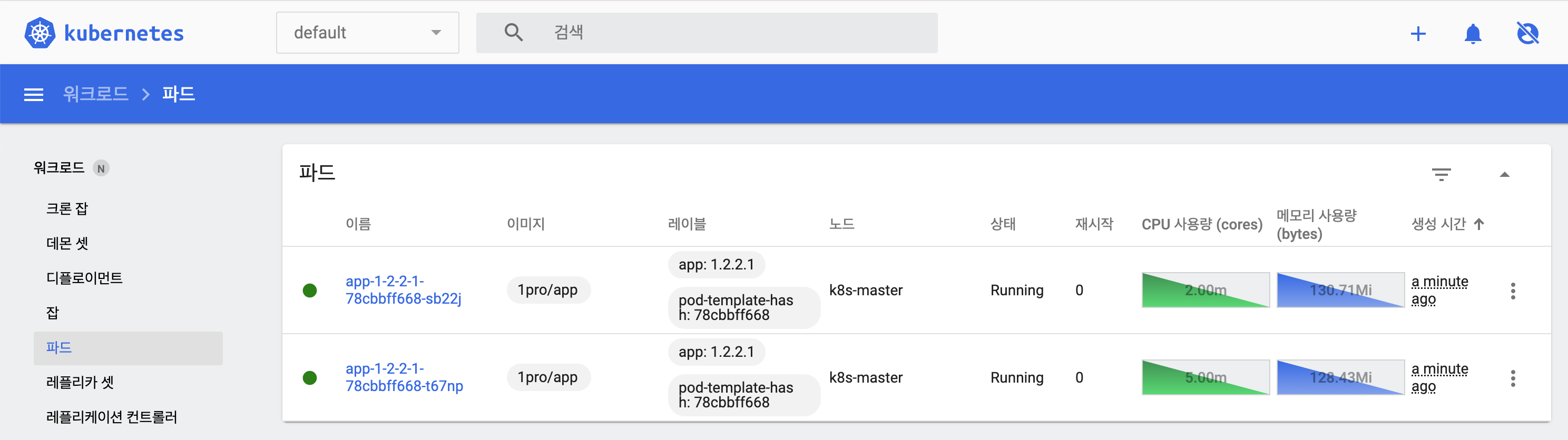
배포확인


쿠버네티스 기능 테스트
# App에 지속적으로 트래픽 보내기 (Traffic Routing 테스트)
while true; do curl http://192.168.56.30:31221/hostname; sleep 2; echo '';  done;
# App에 Memory Leak 나게 하기 (Self-Healing 테스트)
curl 192.168.56.30:31221/memory-leak
# App에 부하주기 (AutoScaling 테스트)
curl 192.168.56.30:31221/cpu-load
# App 이미지 업데이트 (RollingUpdate 테스트)
kubectl set image -n default deployment/app-1-2-2-1 app-1-2-2-1=1pro/app-update
# 기동되지 않는 App 업데이트 (RollingUpdate 테스트)
kubectl set image -n default deployment/app-1-2-2-1 app-1-2-2-1=1pro/app-error
# 업데이트 중지하고 롤백 할 경우
kubectl rollout undo -n default deployment/app-1-2-2-1
# 강의에서 배포한 Object 삭제
kubectl delete -n default deploy app-1-2-2-1
kubectl delete -n default svc app-1-2-2-1
kubectl delete -n default hpa app-1-2-2-1'DevOps > 인프런 워밍업스터디 4기' 카테고리의 다른 글
| Section 9. Application 기능으로 이해하기 - Configmap, Secret [복습, 미션3] (3) | 2025.06.10 |
|---|---|
| Section 7. Object 그려보며 이해하기 [복습] (0) | 2025.06.04 |
| Section 4. 쿠버네티스 무게감 있게 설치하기 [복습] (0) | 2025.06.04 |
| 인프런 워밍업클럽 스터디 4기 DevOps 시작! (0) | 2025.06.03 |
| Section 4. 쿠버네티스 무게감 있게 설치하기 [미션1] (0) | 2025.06.01 |
'DevOps/인프런 워밍업스터디 4기' Related Articles
more


